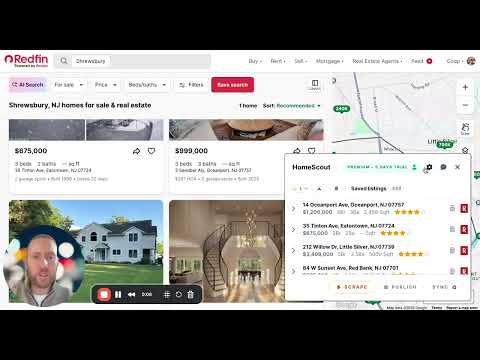
Visit Redfin, HomeScout will appear in bottom right corner.
Open the tool by clicking the arrow
Authorize connection to your Google Account
Managing basic settings
Adjust the position of the tool on your screen.
Auto-open settings when quick-adding a single home
Clear saved listings whenever you want to reset your list.
Feedback & feature requests
Click the chat icon on the top bar to send feedback.
Your message includes your email so we can reply as soon as possible.
Premium Usage
Upgrading, billing, and cancelation
Visit the Account page (the person icon) and click Purchase.
Choose a subscription option to complete payment securely in Stripe.
Cancel anytime from the same place using the Cancel button in the Admin tab.
Google Sheet Sync
Creating and linking to your Homeagent sheet
Sync your saved listings to your linked Google Sheet.
Redfin PowerScrape
PowerScrape lets you scrape all listings off a the results view on Redfin
Navigate to a view that shows a map with a list of results on the side panel
Zoom in to your preferred view, this will determine how many listings are shown in the side panel that we can scrape
You'll see the scrape button light up, click to initiate scraping
Scroll down the list of results and browse each page of results
Once you're content with the total amount of properties scraped, either copy the listings to your saved listings or sync them directly to your Google Sheet
Publish
Publish a shareable web page of your listings for agents or associates.